
A matter changes without anyone telling you. A document is filed, a listing moves, an order issues. The record exists from the moment it happens, but knowing about it means going back to look, and the looking is what gets postponed when there are thirty other matters on the desk. That gap is what case tracking is for.
Most practitioners solve it with a system of their own. A diary entry, a note in the file, a recurring reminder to check the court lists. It works until a week is busy, and then it works less well. Case tracking on Vizlegal takes most of that checking off your hands: you tell the platform which matters you care about, and it keeps their record in front of you.
What following a case actually does
Every case in Vizlegal carries a FOLLOW button in its top action bar. Pressing it changes two things at once. The button becomes UNFOLLOW, and a new one appears beside it: VIEW IN MY CASES.
That second button is the useful part. The case has been added to a working list, and it stays there with everything attached to it. You do not need to remember how you found it or run the search again.
Following works the same way across sources. An Irish High Court record, an England and Wales filing, a planning application before a local authority: the button behaves identically, and the followed matters sit together in one list, whichever of our 39 sources they came from. For a practitioner running a matter that touches more than one forum, that is the difference between one list and three.
The case detail, and its dates
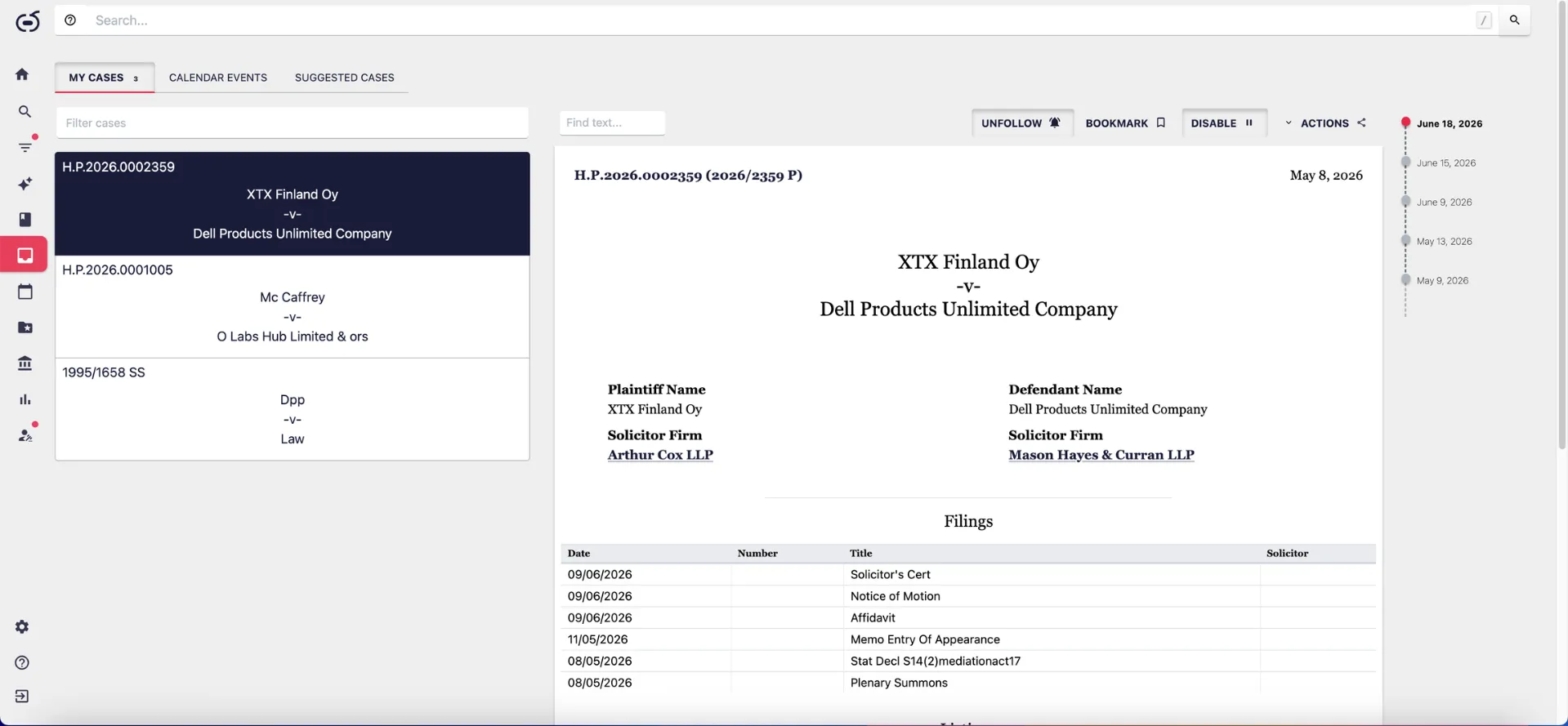
Open a followed matter in MY CASES and the right side of the screen shows the record as the source holds it. For an Irish High Court record, that means the parties with the firm on record for each of them, a Filings table with the date, the number, the title of each document and the solicitor, and a Listings table below it. Other sources hold a different shape: an England and Wales filing carries a Case Details block with the filing date, the last updated date, the court and list, the status, and the case type. The screen follows the source rather than flattening everything into one format.
Running down the far right there is a column of the dates on the record. This is a small thing that changes how a matter reads. Rather than reconstructing the sequence from the filings table, you see the shape of it: when it started, how often something has happened, and how recent the last movement was. A practitioner picking up a matter mid-stream gets that orientation in a couple of seconds.
The left column of MY CASES holds the full list of followed matters, with a filter box at the top. On a caseload of any size the filter is what makes the column usable, narrowing it to a party name, a client, or a case reference.
Following a timeline, not just a case
A matter that moves between bodies is harder to follow than a matter that stays in one court. A complaint decided at the WRC can be appealed to the Labour Court. A tribunal decision can be judicially reviewed, run through the High Court and the Supreme Court, and end in a separate costs ruling. Each step is recorded by a different body, under a different reference, and often under a slightly different party title, so there is no shared identifier to search on.
Timelines join those records anyway. Where a decision belongs to a longer procedural chain, the timeline shows the chain as one sequence: the first instance decision, the appeal, the judicial review, the superior court judgments, and, where an Irish court has referred a question to Luxembourg, the reference itself, the questions referred, the Advocate General’s opinion, and the ruling. Landing on a WRC decision, you can see whether it went on to the Labour Court without running a second search. Where no timeline appears on a record, no related document has been found.
The timeline can also be followed in its own right, and that is the part worth knowing when you are waiting on something that has not happened yet. A reference sitting with the Court of Justice has no ruling to read. A judicial review listed for hearing has no judgment. Following the timeline means the next step reaches you when it issues, rather than when you next remember to look. New appeals are picked up as they are lodged and added to the chain, so a matter that travels from the Labour Court to the High Court stays one record rather than becoming two.
Followed cases and followed timelines both report by email, with anything new detected arriving at 7 am.
Court dates, in one calendar
The CALENDAR EVENTS tab is where case tracking moves from research into the diary.
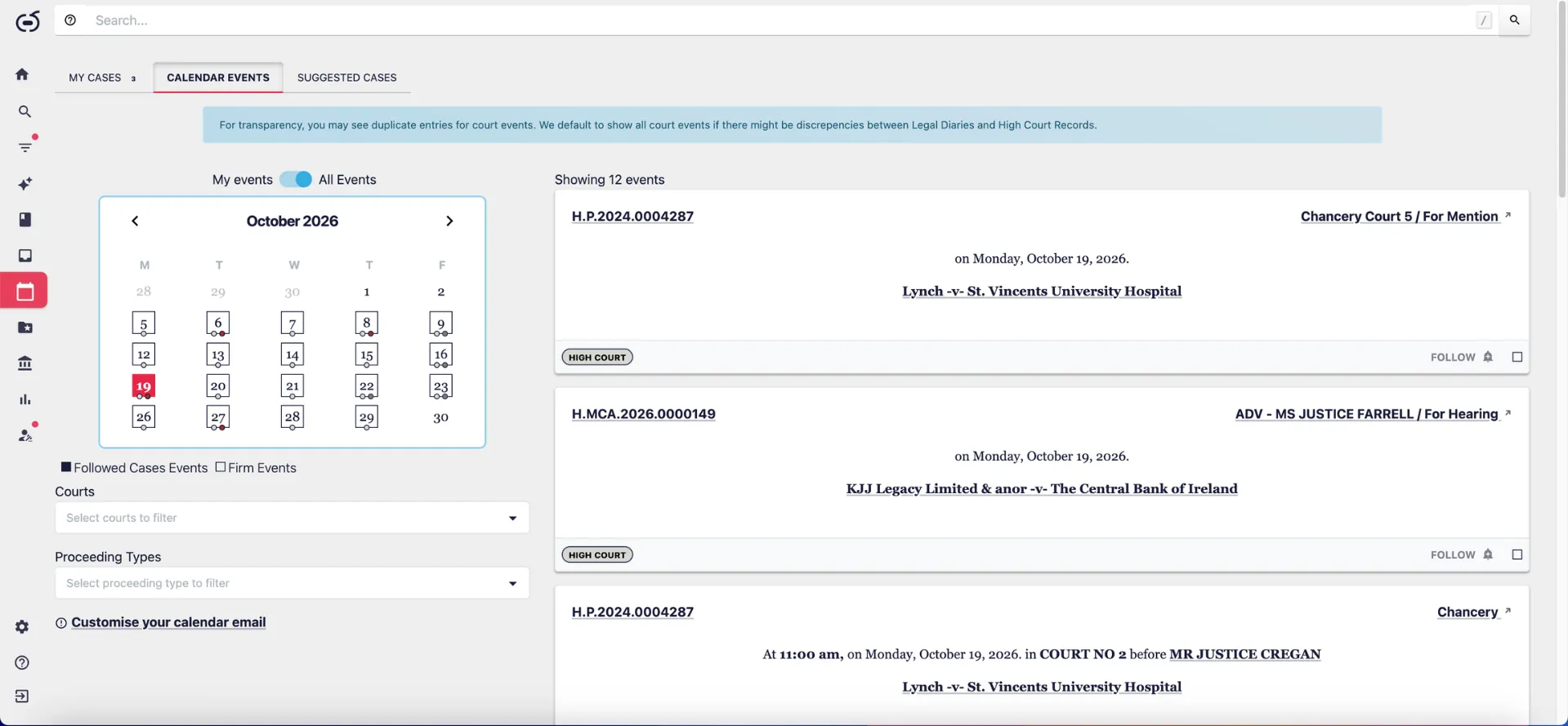
The tab shows a month view with the days carrying events marked. Click a marked day and the panel on the right lists what is happening: the record number, the listing type, such as for mention or for hearing, the date, the parties, and the court. Where the listing carries them, the time, the court number, and the judge appear as well. There is a toggle between your own events and all events, and Courts and Proceeding Types filters when a month is busy enough to need them. On the grid, days carrying a matter you follow are marked differently from days carrying the firm’s own listings.
Each event in the panel carries its own FOLLOW button, so a matter that turns up in a list you were already watching can be added without leaving the calendar.
Two things are worth knowing about how this is built. The calendar is drawn from what has been extracted from the court diaries and the High Court records, and it is updated daily, which means it reflects the record rather than a manual entry someone made. Where those sources do not agree, the platform shows every version of the event and says so on screen, rather than picking one and presenting it as settled. For anyone who has ever been caught by a listing that moved, seeing the discrepancy is more useful than a clean single answer that might be the wrong one.
There is also a Customise your calendar email link on that screen, for practitioners who would rather have the week arrive in an inbox than open the platform to check. Premium users can also sync the calendar to Outlook, so followed court dates sit in the same diary as everything else.
Alerts, for what you are not watching yet
Following a case assumes you already know the matter exists. A good deal of what a practitioner needs to know does not work that way.
MY ALERTS covers the other half. An alert can be set on a whole source with filters applied, so that anything new matching those conditions arrives as it lands. It can also be set on a keyword within a source, which is how practitioners keep a watch on a concept rather than a case: a term of art, a statutory provision, a type of claim.
Saved alerts sit in a list with their conditions shown beneath each one, and the new material appears alongside. Each alert can be paused, run immediately, or marked as read. In practice most teams end up with a small number of standing alerts, a set of followed matters, and a timeline or two under watch, and together they cover both the known and the unknown.
Where case tracking earns its place
None of these tasks is difficult on its own. A determined practitioner can check the court lists, watch a source, and keep a diary. What makes them costly is doing all three, every week, for every live matter: effort that grows with the caseload and leaves no trace when it goes right.
Case tracking moves that effort off the desk. What a litigation team notices first is that nobody is asking whether someone remembered to look.
For barristers managing a wide spread of matters across courts, the calendar view is usually the entry point. For solicitors, it tends to be the filings, because early notice that the other side has lodged something changes how a matter is prepared. For employment practitioners, it is the timeline, since a WRC decision that matters is often the one that goes further. For in-house teams, it is the ability to see every matter where the organisation is a party or a notice party in one list. For planning consultants and planning solicitors, it is following applications alongside court matters in the same list, drawing on the only database of all Irish planning applications.
Getting set up
Following a matter on Vizlegal puts its record, its court dates, its procedural history, and anything new in one place, and keeps them there without anyone having to remember to check.
If you already use Vizlegal, open any case and press FOLLOW, then check the CALENDAR EVENTS tab for what your followed matters have coming: app.vizlegal.com
If you are not a user yet and want to see this against matters you are actually running, book a demo today at vizlegal.com/contact and we will walk through it on your own caseload rather than a demonstration file.